Hyprland
One layer surface per monitor, above every window. It is a fixed transparent canvas sized for the largest state, so the compositor never resizes it mid morph, and its input mask follows the pill so everything around it stays clickable.
Isla is the shell I built for Hyprland on NixOS. One black pill hangs from the top of every screen and springs open into a launcher, notifications, Spotify, WhatsApp and the menus of your tray apps, then tucks back in.
Written in QML on Quickshell, with WhatsApp running in QtWebEngine. Used every day at 155 Hz and 240 Hz.
Hover the pill to open it. Press / to search.
It sits where a notch would be and keeps out of the way. Reach for it and it becomes the desktop.
Super
Type to search your apps. With nothing typed it lists only what is already open, so the same field doubles as a window switcher.
Enter on an app that is already running jumps to its window instead of opening a second one. The workspace lens slides over to where it lives.
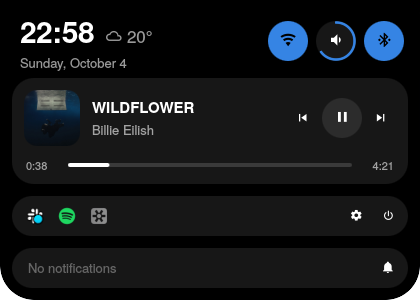
The pill swells into a banner with the app's picture, two lines of text and its actions, then tucks back in when its time is up. Hovering holds it there.
When more are waiting, a badge counts them, and the next one follows as soon as you act on this one.
SuperShiftS
The screen freezes. Drag across it to take a region, or click a window to take just that window. The shot is copied and saved to Pictures/Screenshots in one go.
Then the pill shows it, thumbnail first. Edit opens it in Satty to annotate and crop, Folder opens where it went. Print takes a region, Shift+Print the whole monitor, Alt+Print the focused window.
SuperS
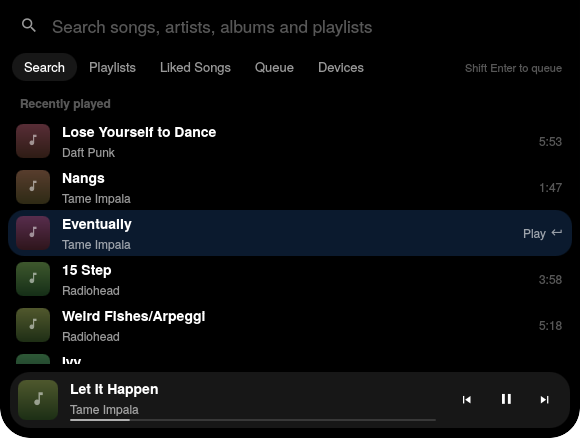
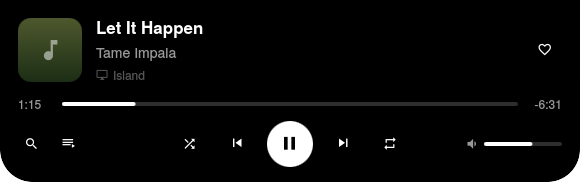
While something plays, album art and a small waveform slide into the resting pill, and a track change peeks for a moment. Super+S opens the player itself: now playing, search, playlists, liked songs, the queue and your devices.
Press play in Isla and the music plays here, even if a TV or a phone had it a minute ago. Pausing, skipping and seeking never move it.
Sound comes from spotifyd, a Spotify Connect daemon written in Rust that uses about 38 MB of memory. The official app never has to be installed.
SuperW
Super+W grows the pill into WhatsApp Web. It runs inside the shell, not in a browser window, and Isla repaints it: true black, your accent instead of WhatsApp green, and no rail, banners or promos.
Ctrl+B folds the chat list away so the open chat gets the whole panel, with your four most recent chats up in its header. Ctrl+K opens a switcher: type a name, press Enter.
Voice and video calls work, and scrolling is smooth. Close the panel and WhatsApp keeps running, so messages still arrive as notifications. Quit in its menu stops it.
Right-click an app in the tray and its menu opens inside the pill, where the notification history was. Every app's menu looks the same: rows on the pill's black, hairline separators, a check next to whatever is on.
A submenu takes the menu's place with a back row instead of cascading off to the side. Esc goes back one level, a click outside closes it.
SuperI
Each monitor gets the full pill with its own workspaces. Super+I trades it for a minimal one on all of them: the clock, and whatever is playing.
Super+Space switches the keyboard layout and says so in the pill. The desktop shell's own popups for Caps Lock, Wi-Fi, Bluetooth, night light and the rest are switched off, so nothing pops up outside the island.
Text and accents come from the desktop theme's palette file and change the moment it does, inside WhatsApp too. The pill itself stays true black, so it reads as part of the bezel.
An accent that is too dark to read on black gets lightened until it holds 4.5:1 contrast. Try one: this page follows the same rule.
One layer surface per monitor, above every window. It is a fixed transparent canvas sized for the largest state, so the compositor never resizes it mid morph, and its input mask follows the pill so everything around it stays clickable.
Each state is an Activity with a priority: compact, track peek, volume and layout, expanded, notification, Spotify and WhatsApp, launcher. The highest one that wants the screen gets it. A new state is one more Activity.
Quickshell is patched to start Chromium's engine before the app, so WhatsApp Web runs as a view inside the pill, on its own profile, with Isla's stylesheet and script injected and the palette sent again on every theme change.
Tray apps publish their menus over D-Bus. Isla reads them and draws every row itself, so a Qt, GTK or Electron app's menu all come out looking alike.
Minimal mode, the folded chat list and whether WhatsApp was running live in one small JSON file, so restarting the shell puts everything back where it was.
Declared in nalyx, my NixOS configuration, next to spotifyd, the patched Quickshell and the screenshot tool. A rebuild brings the whole thing back on any machine.
Width, height and radius each follow a damped spring solved in closed form against the real frame time, so the motion is the same at 155 Hz and 240 Hz. Opening, the height overshoots a little (response 0.50 s, damping 0.72). Tucking back in, it settles firmly (0.40 s, 0.88).
Everything above is a recreation in HTML. These are captures of Isla running.


Isla lives in nalyx, my NixOS configuration, under
home/features/desktop/hyprland/isla.